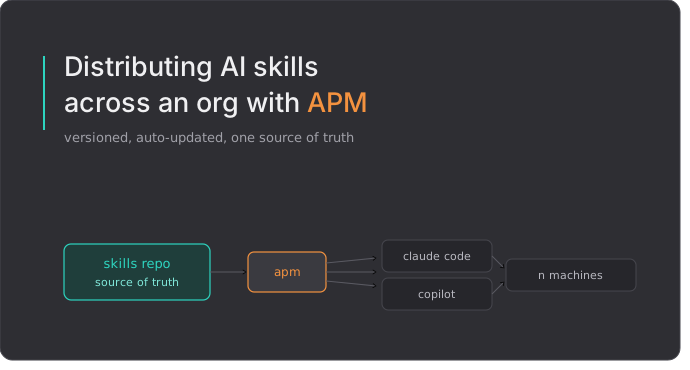
Without skills, every developer feeds the agent a raw prompt and prays. Either it nails the team’s conventions or invents some StackOverflow-grade thing you now have to refactor by hand. So you write skills — and then the real problem starts: getting them onto every developer’s laptop, keeping them fresh, and not turning the agent into a token furnace.
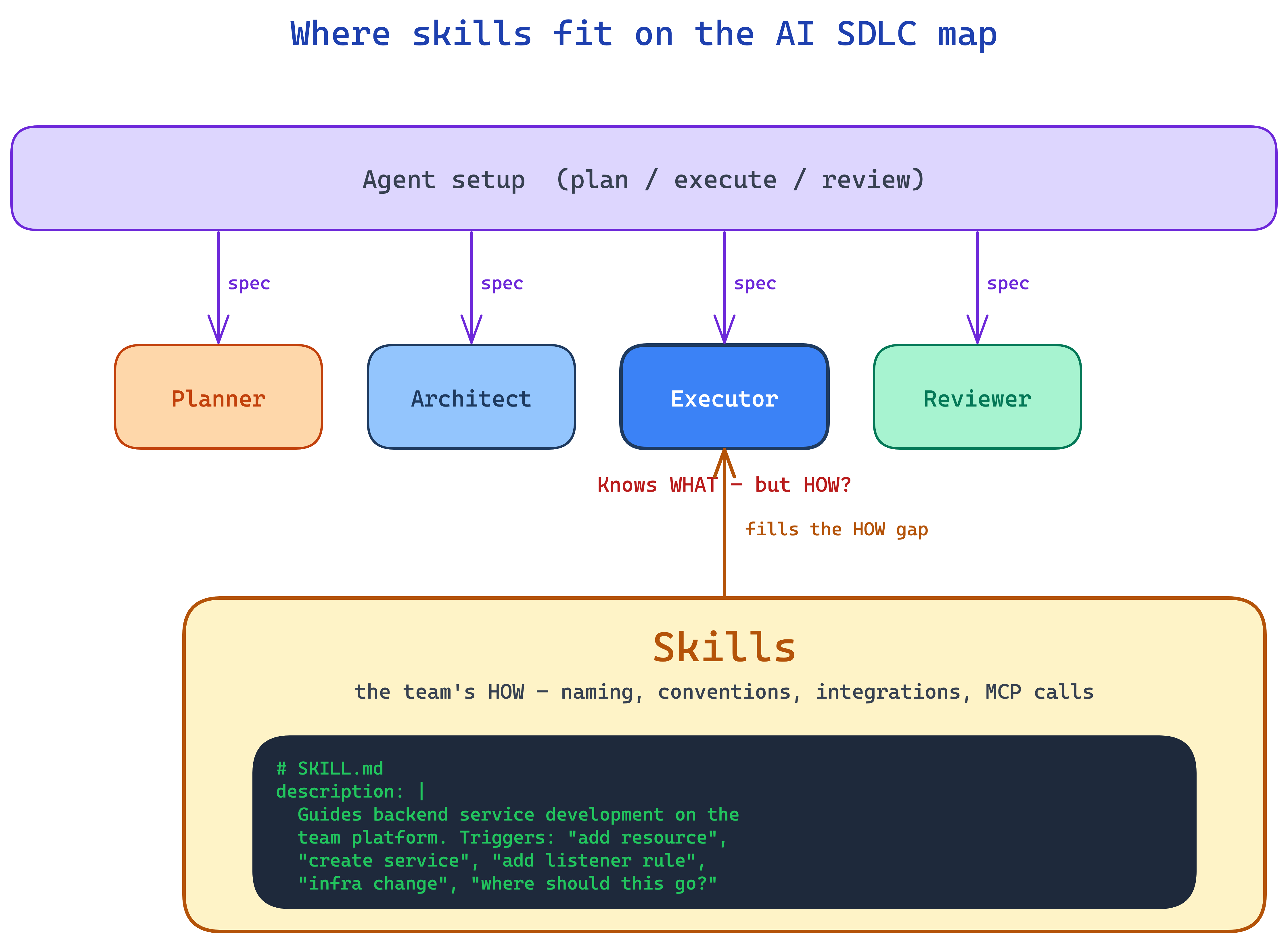
Where skills fit on the AI SDLC map
Modern coding agents are often set up with a plan / execute split. One pass to think through what needs to happen, another to actually do it. Sometimes more roles are bolted on — a reviewer, an architect, a tester — but the load-bearing one is the executor.
When the spec lands on the executor, it knows WHAT to build. The problem is that it does not know HOW your team builds it. Naming conventions, where to place which resource, which shared component to integrate with, which MCP server to call for the policy document.
That is the gap skills cover.
Every team builds its own skills. That is “project knowledge”. Individual engineers build their own skills too. That is “personal knowledge”.
From the Platform Team perspective, we can produce and distribute a third layer:
- Company knowledge skills. How we do things in our org. How we work with our specific technologies and internal implementations.
- Role expertise skills. If someone on the Platform Team is an expert in infrastructure, they package that expertise as a skill. Product teams then do infra work without pulling the expert into the loop.
A skill is just a folder with a SKILL.md and some optional reference files. The agent loads only the description field at startup, and reads the rest of the skill when your prompt matches that description.
So the description is the entire API. It is what the agent matches against to decide whether to fire your skill. Write it with the exact phrases developers actually type — not paraphrases, the real prompts from real users.
The distribution problem
So you have built the skills. Now what?
Each developer has a home directory with an AI tool config — ~/.claude/skills/ for Claude Code, ~/.copilot/skills/ for GitHub Copilot. In theory, you just get your skills into those folders on everyone’s machine and you are done.
In practice this is where platform teams write:
- A README telling people which folders to copy.
- A shell script that clones a “golden repo” and rsyncs files.
- A Backstage template that scaffolds the files once and immediately starts drifting.
All three have the same failure mode: no single source of truth, no versioning, no way to push a fix. Copy-paste works right up until it does not, and then you are chasing down why the same skill behaves differently on five different laptops.
This is the exact problem npm, pip, and cargo solved for code dependencies decades ago. A manifest, a resolver, a lockfile, a reproducible install. Agent configuration deserves the same — and that is what APM gives you.
Meet APM
APM (Agent Package Manager) is an open-source tool from Microsoft. It treats AI agent configuration the way npm treats JavaScript dependencies. You declare what you want in an apm.yml, run apm install, and APM resolves the tree, pins exact commits in a lockfile, and deploys files to the directories your AI tools actually read from — .claude/, .github/, .cursor/, .opencode/.
APM normalizes everything to two delivery shapes:
- A full package — a git repo with an
apm.ymlmanifest and a.apm/tree bundling all the standard primitives every supported tool understands: skills, agents, prompts, instructions, hooks. One versioned unit, one lockfile entry. - A single primitive — most often an individual skill, imported straight from a subdirectory of a repo. No
apm.ymlrequired at that level. APM calls these “single-primitive imports”.
For a platform team, packages are the “team kit” pattern — a coherent bundle of conventions you ship together. Single-primitive imports are for one-offs that do not belong to any specific kit.
You host packages on any git host APM can reach — GitHub, GitLab, Bitbucket, self-hosted. We host on GitLab.
One detail that matters more than the rest: skills and their MCP servers travel together. A “create Jira ticket” skill without the Atlassian MCP server is just a doc. A package can declare its MCP dependencies right next to its APM dependencies, and when a developer installs the package, APM walks the whole tree — including transitive packages — and collects every MCP server declared anywhere in it. The developer runs one command; the agent ends up with both the skill and the tools it needs to do something with it.
The exact apm.yml schema, available targets, and CLI flags live in the APM repo. I’m skipping them here because that’s the part that will change between releases — the rest of this post is about how to wrap APM into something a platform team can actually run.
The setup: user-level global skills
Most APM tutorials show you a project-level apm.yml committed to a repo. That is fine when skills are tied to one codebase. But a competence center’s skills are not — they apply across dozens of services the developer works on. Asking every engineer to add an apm.yml to every repo is exactly the kind of ceremony that kills adoption.
The pattern that worked for us: user-level, global skills. One manifest per developer, in their home directory. Applies everywhere.
Three pieces:
1. A package in GitLab that holds the team’s “standard” kit — for us this is the backend template package produced by our Backstage template. A proper APM package with its own apm.yml and a .apm/ tree carrying skills, agents, prompts, instructions, and hooks together as one versioned bundle.
2. A monorepo of individual skills — one-off skills that do not belong to any single template (company-specific integrations, knowledge skills, utilities). APM pulls each one as a single-primitive import directly from its subdirectory, so they ship independently of any package.
3. A user-level manifest at ~/.apm/apm.yml on each developer’s machine that pulls both:
name: my-workspace
version: 1.0.0
dependencies:
  apm:
    - gitlab.com/<yourorg>/apm-packages/backend-template
    - git: https://gitlab.com/<yourorg>/ai/skills.git
      path: repo-onboarding
    - git: https://gitlab.com/<yourorg>/ai/skills.git
      path: azure-secret-rotation
  mcp: []
Running apm install -g (the -g flag is what makes this global — it installs to ~/.apm/ instead of the current project) deploys these skills to ~/.claude/skills/ and ~/.copilot/skills/. No plugins, no wrappers. The tools just pick them up.
Keeping it fresh: the SessionStart hook
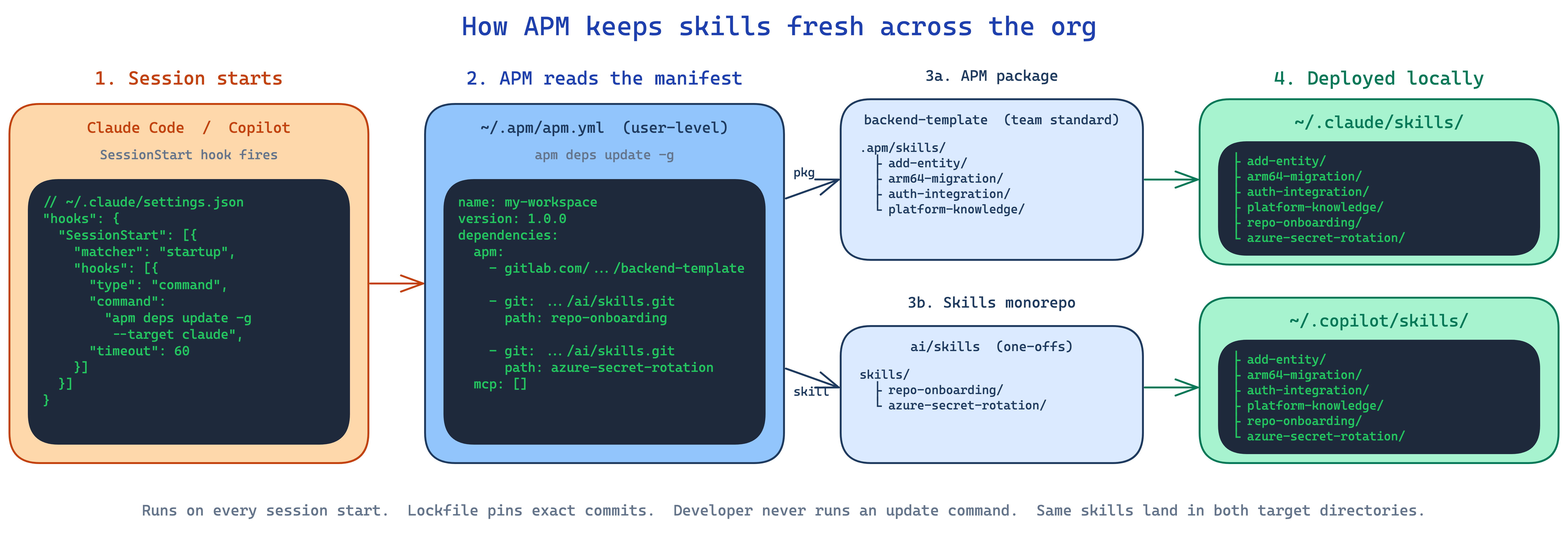
Shipping skills once is easy. Keeping them fresh across hundreds of machines is the real problem. Our answer: a SessionStart hook that runs apm deps update every time the agent starts.
For Claude Code, in ~/.claude/settings.json:
{
  "hooks": {
    "SessionStart": [
      {
        "matcher": "startup",
        "hooks": [
          {
            "type": "command",
            "command": "apm deps update -g --target claude",
            "timeout": 60
          }
        ]
      }
    ]
  }
}
For Copilot, the same idea lives in a ~/.copilot/hooks/ JSON file. Every time a developer starts a session, APM checks the lockfile, pulls any updated skills, and redeploys them. Five seconds of latency. Fresh skills forever.
This is the part that flips APM from “a package manager” to “a distribution system”. The user never runs an update command. They never even think about it. Platform pushes a change to the skill monorepo. Next time the developer opens Claude Code, it is there.
What skills look like in practice
A quick tour of the actual skill categories we ended up with. This is the part where I think other teams will recognise themselves.
Static external knowledge. A platform-knowledge skill teaches the agent how our internal infrastructure platform is laid out — where the shared ALB lives, how services join the cluster, how SSM contracts work. Pure reference material. The skill has SKILL.md, a references/ folder with architecture markdown and diagrams, and evals/evals.json to verify the agent picks the skill up on the right prompts.
Actual information lookup. A CDK tags skill needs the company tag policy, which lives in Confluence and changes more often than I would like. The skill knows to call the Atlassian MCP server’s get_page or search_page to fetch the current policy on demand. The skill itself is small. The Confluence page is the source of truth. No copy-paste, no drift.
Company-specific systems. Our GitLab is managed by a Terraform project — adding a new repo means writing the right entry in the right tfvars file, opening an MR, asking the right reviewer questions. A repo-onboarding skill walks the agent through all of it.
Integrations. An auth-integration skill wires up ABAC authorization for a .NET microservice — NuGet packages, the PEP handler, DI registration, the policy manifest. This kind of multi-step, multi-file integration is exactly the place where a raw prompt produces “creative” code that nobody wants to review. With the skill, the result is the same shape every time.
The pattern: each skill captures something a platform team would otherwise be writing into a wiki page that nobody reads.
The part nobody warned me about: bloat
Here is the thing that surprised me once we had ~25 skills deployed.
A developer asks the agent to rename a variable. Three skills match the description loosely — one for “refactor”, one for “code change”, one for “cleanup”. The agent loads the full SKILL.md of each, decides this is a multi-step change, opens a plan, fetches a reference file, checks a convention. Eight thousand tokens of thinking later, the agent renames the variable. A one-line change cost a full planning pass.
The cause is not APM. The cause is the description field. When team A writes “Triggers: refactor, rename, cleanup” because they want their skill to fire on refactors, they have also volunteered the skill for every variable rename in the codebase. Distribution does not filter for relevance — it just makes sure the loosely-matching skill is on everyone’s laptop, ready to fire.
Two things help, partially:
- Narrow descriptions. A skill that fires on
add ALB listener ruleshould not also fire onchange ECS task. Spell out the specific surface, not the category. The temptation to write “covers all infra changes” is exactly what kills the agent’s tokens. - Evals next to the skill. Each
SKILL.mdcan have anevals/evals.jsonwith prompts that SHOULD trigger and — more importantly — prompts that SHOULD NOT. CI runs them. The wrong-trigger half is the work that quietly does not happen, because writing negative cases is harder than writing happy paths.
That is not a solution. That is two practices that move the curve a little. I do not have a clean answer for this yet — and I think it is worth being honest about. The next problem worth solving in this space is not how to ship more skills. It is how to keep the catalogue worth installing.
Onboarding: one prompt
The bootstrap still has to happen somewhere — install APM, write the manifest, add MCP servers, set up the hook. But you do not have to teach it. You ship a setup prompt that the developer pastes into Claude Code on a fresh machine, and the agent does it all:
You are setting up the APM (Agent Package Manager) skill distribution system on my machine. Install APM, configure MCP servers, write
~/.apm/apm.yml, add theSessionStarthook, and run the initial update.
The real prompt sets a TARGET_AGENT and a TARGET_OS variable at the top, then walks through five concrete steps with the exact commands for each combination. The agent installs itself, basically. New hires go from zero to fully configured in a few minutes with no platform-team babysitting.
What I would watch out for
- Skill descriptions are your API. If discovery breaks, the skill might as well not exist. Test with the real phrases developers actually use, not the ones you wish they used. (And as the previous section argues — test the negative prompts too.)
- Lock down the MCP permissions. When you add the Atlassian or GitLab MCP servers, the default tool surface is wide. Explicitly deny the write-side tools in
settings.json(createConfluencePage,editJiraIssue, etc.) unless you really want the agent editing tickets on its own. - One minor gotcha:
apm installonly deploys to~/.claude/or~/.copilot/if those directories already exist. Run the agent once first, or create them in the setup prompt.
The shift
The thing that surprised me most building this: it is not really about APM. APM is fine, it works, whatever. The real shift is treating AI skills as a platform product — which also means having to garden the catalogue, not just ship it.
Competence center writes the skills once. Distribution, versioning, and updates are automated. Developers do not copy files or follow READMEs. They open their agent and it knows how the company builds things.
That is the same operating model we have had for code dependencies for twenty years. It was only a matter of time before agent context got it too.